- Why Capital X Panel Designer
- Impressive benefits
- The advantages of cloud
- Significantly lower cost
- On premise software (offline privacy)
- Benefits
- No setup and installations, just simple drag and drop
- New Autowiring that automatically wires symbols
- Automatic wire splitting when placing symbols
- Designed for minimal typing
- Intelligent automatic numbering
- Symbol and wire inheritance
- Super smart wires
- Auto straightening wires
- Easy to use wire links
- Real-time cross reference
- Powerful circuit reuse
- Reusable prefab circuits
- Assigning components
- Assigning Cables
- Innovative CableTag symbol
- Customizable component database
- Symbols with brains built in
- Piping and Instrumentation Diagram (P&ID)
- Smart P&ID symbols
- Boost your electrical circuit drawing workflow with Capital X Panel Designer
- Seamless component integration with CADENAS
- Built for collaboration
- An electrical engineering design software for any device
- Team based dashboard
- Fully customizable access control
- Real time collaborative editor
- Built in version control
- Industry standard SVG file format
- Desktop and app notifications
- Built in chat system
- Javascript based plugins
- Intelligent symbols
- Electrical drawing software symbols with multiple forms
- Flexible PLC symbol
- Symbols that understand electrical systems
- Electrical CAD drawing software symbols that looks awesome
- Making your own symbols in an electrical drawing software
- Automatic cross-reference symbol
- Easily view component information
- Easily view cable information
- Symbols that just works in multiple units
- Automatic pin sets
- JIC/NFPA and IEC symbol library
- Powerful search capabilities
- Smart connector symbol
- Electrical schematics
- Automatically generate, count and number terminals
- Multi tier terminals
- Generating panel layout
- Automatically snap layout symbols on rails
- Importing multiple formats
- Extensive report generation
- Exporting and importing reports
- Create your own title blocks
- Automatic page prefix
- Enhanced Ladder Zone functionalities
- Realtime reference window
- Sample drawings
- JIC / NFPA Sample Drawing
- IEC 60617 Sample Drawing
- P&ID PIP Sample Drawing
- Hydraulic Sample Drawing
- Pneumatic Sample Drawing
Benefits of Cloud-Based CAD Electrical Drawing Software
No setup and installations, just simple drag and drop
We know electrical engineers have heavy responsibilities, designing circuits that are safe while keeping costs low, in addition to testing and commissioning projects that have strict timelines. The last thing they have time for, is to attend training or read manuals.
In the fast-paced world of electrical engineering, staying ahead of the curve is crucial. That's where state-of-the-art electrical design software comes into play. Capital X Panel Designer is at the forefront of this technological revolution, offering impressive benefits to electrical engineers and designers. This cloud-native Electrical CAD Software is designed to simplify the intricate process of electrical design, making it accessible and efficient.
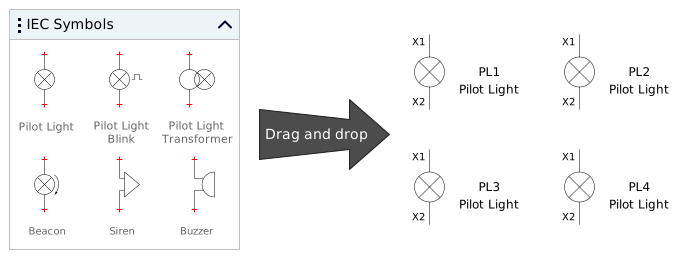
Capital™ X Panel Designer requires no installation, only a secure sign-in and you're in business. It is mainly drag and drop, with no training and manuals required, especially easy to pick up again when the need arises, ensuring you get to do the important stuff while the CAD electrical software takes care of the rest.
 Easy to use, cloud native Electrical CAD software with mainly drag and drop
New Autowiring that automatically wires symbols
When choosing an electrical CAD software, you would want something that makes your life easier. In Capital X Panel Designer, you only have to drop your symbols next to one another, and the electrical CAD design software will automatically wire them to the next sequential wire, all without manual intervention.
When compared to manual wiring, auto wiring is nearly 3 times faster with much fewer errors, and it works for both JIC/NFPA and IEC60617, horizontal and vertical circuits, including for electrical, pneumatic and hydraulics.
 Find out how auto wiring drastically improves your productivity and lets you complete your circuits much faster
See also: Automatic wiring for electrical, hydraulic and pneumatic circuits
Automatic wire splitting when placing symbols
Change is constant, especially in electrical engineering. When you have a need to insert a symbol on your circuits, Capital X Panel Designer automatically splits your wires and rename them, letting you complete your circuits much faster.
Wire splitting works on power circuits, controls circuits and even on pneumatic, hydraulic and P&ID circuits. Create and complete your circuits easier and faster with wire splitting.
 Capital X Panel Designer helps you automatically split and rename your wires when you insert symbols into your circuits
Designed for minimal typing
Being electrical engineers ourselves, we wanted to create an electrical CAD software that we would want to use ourselves, without the tedious typing and manual errors. Therefore, we designed an electrical engineering drawing software that reduces typing.
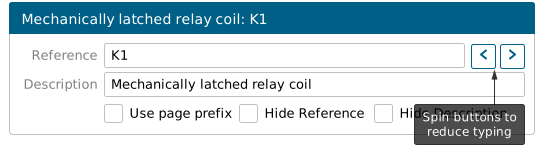
All symbols and wires in Capital X Panel Designer are intelligently and automatically renamed, and even when typing is required, spin buttons are available on most dialogs for modifications using the mouse only, keeping it fast and speedy.
Intelligent automatic numbering
One of the most repeated task during electrical circuit creation is the duplication of symbols and wires. When duplicated, Capital X Panel Designer automatically and intelligently renames symbols and wires to the next available sequential number (eg: R1 to R2), saving an immense amount of time and avoiding errors.
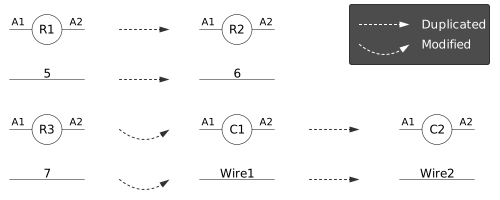
If a symbol reference is modified (eg: R1 to C1), and then duplicated, Capital X Panel Designer will intelligently use the new reference and rename duplicates accordingly (eg: C1 to C2).
This means that you can rename your symbols and wires as you deem fit, and Capital X Panel Designer will instantly rename them, no complicated setup and configuration required.
 Find out how intelligent numbering automatically tags your symbols and wires and helps you create circuits easier and faster
Symbol and wire inheritance
With Capital X Panel Designer's online electrical drawing software assigning new components is faster and easier.
If a symbol is assigned to a component, say an Omron relay, when duplicated, the symbol will continue to inherit the component. This results in a ton of time savings, without the need to assign components over and over again.
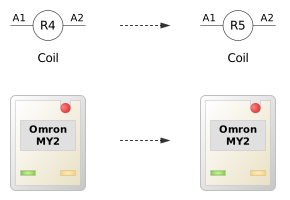
In Capital X Panel Designer, we really wanted to design an electrical CAD software that lets you perform a task once and reuse everything else, so that you get to get things done quickly and efficiently.
 What is smart inheritance, and how it can help you assign components to circuits quickly
Super smart wires
Wires in Capital X Panel Designer are super intelligent. When a wire is placed on another, they will automatically be connected, and assume the name of the connected wire.
When a wire name is modified, the changes will be automatically propagated to all connected wires, even over wire links and multiple pages.
Connection dots are automatically managed based on connection types, without the need for user intervention, for even faster schematics.
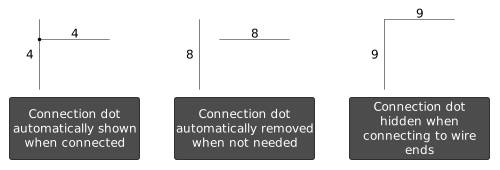
 How smart wires in Capital X Panel Designer help you complete circuits much faster with less errors
Auto straightening wires
In electrical circuit design, change is guaranteed and there is a constant need to modify circuits. Depending on how you modify them, it can be a pain to get exactly what you wanted.
Capital X Panel Designer totally understand electrical conventions, and will automatically straighten wires to ensure your modifications are easier and faster. We stress over little things like this so that you don't have to.
 How auto straightening wires helps you with less drafting, so you can concentrate on safety and design
Easy to use wire links
Drop them, pair them, done.
Wire links allow you to connect a wire to another part of the page, or to another page. When connected, wire links automatically shows the wire name and location of the target link it is paired to.
Wires that are connected to wire links behave as if they are connected to normal wires, that is, wire name detection and propagation will continue to work, even over multiple pages.
 How to use wire links and easily pair them to extend wires over multiple pages
Real-time cross reference
Capital X Panel Designer electrical CAD design software makes finding your symbols and wires faster and easier with real-time cross reference. Just put in the reference and description you need, and this electrical CAD software will instantly display the location of the symbols and wires you need.
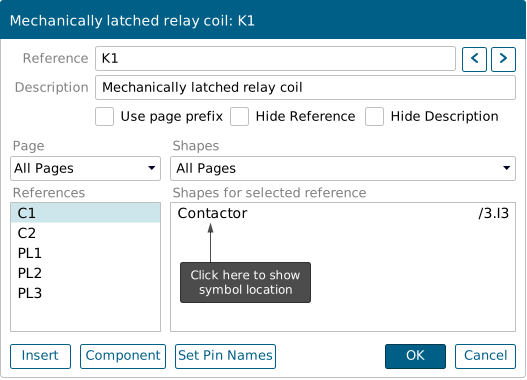
Know exactly how many symbols and wires you have in your drawing and their location with Capital X Panel Designer's real-time cross reference. With this, you can produce highly detailed electrical, pneumatic and hydraulic drawings quickly and easily.
 Easily find the location of your symbols and wires with real time cross reference
Powerful circuit reuse
When drawing circuits, the most often used operation is copy and paste. Capital X Panel Designer removes the tedium of this process by automatically renaming all your symbols and wires accordingly.
Our electrical engineering drawing software ensures you get unparalleled productivity gains with huge savings in time and money.
 Powerful circuit reuse in Capital X Panel Designer lets you save your circuits to be reused over and over again without much work
Reusable prefab circuits
Why tediously repeat your circuit drawing process? Capital X Panel Designer's online electrical drawing software lets you create circuits once, and save them to be reused forever.
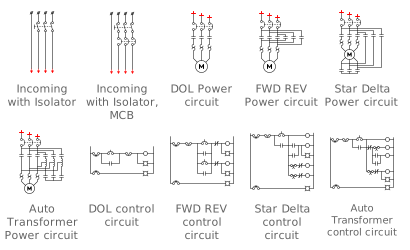
Build up a collection of your commonly used circuits and never redraw them again! Capital X Panel Designer also lets you share them with your team, so the productivity gains extend to your entire company.
 How to save your own (prefabricated) circuits so your entire team can reuse it over and over again
Assigning components
In Capital X Panel Designer, you can assign components when you create a symbol, and when you drop the symbol onto your electrical drawing, your components will be reflected in the Bill of Materials (BOM).
In addition, you can also reuse a symbol (eg: contactor) and assign components upon completion of circuit design and be able to specify different dimensions and ratings for your symbols using Manage Components.
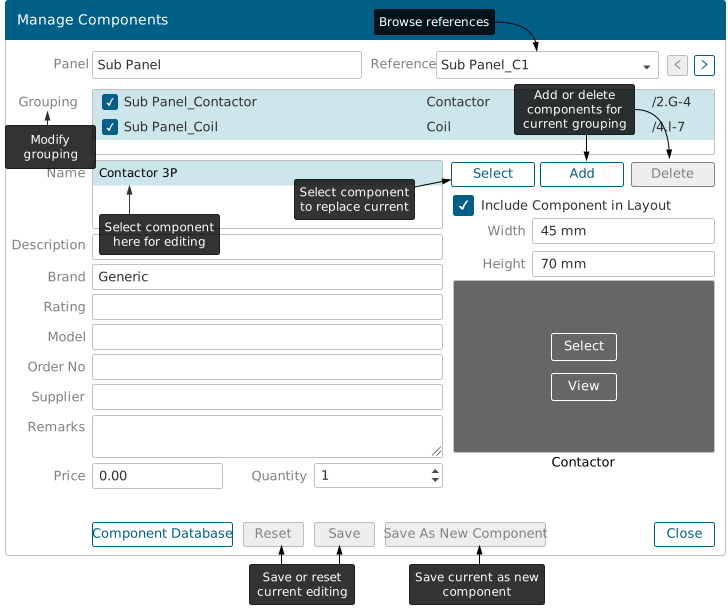
You can even assign multiple components, for example, assigning relay clip and relay base to your relay symbol, so that your Bills of Materials (BOM) is complete and accurately reflect the components required for the entire design.
 Easily assign components to your circuits to generate Bills of Materials
Assigning Cables
Single core or multi core cables can be easily assigned to wires, with a simple right click on a wire or using the "Manage Cables" menu.
Cable specifications are stored in a database so that they can be re-used over and over again without typing. Once assigned to a wire, the specifications are then stored in the drawing itself for portability, where a drawing can be easily shared without losing embedded cable information.
Innovative CableTag symbol
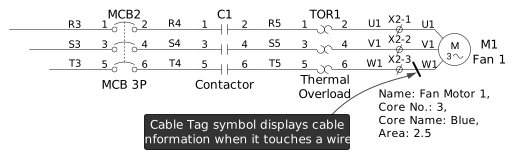
Showing cable information is as easy as dropping a CableTag symbol onto a wire.
Once dropped, the CableTag will automatically display cable information on any wire that it comes into contact with, without further actions from users.
Additional information including brand, supplier, model, cores, pricing or other options are available by right clicking on the CableTag.
Customizable component database
Component databases can be easily exported to your favourite spreadsheet for modifications or insertions before being imported into Capital X Panel Designer again.
Once inserted, you can then assign component specifications from manufacturers including model, rating, and dimensions, into your electrical drawings without the need for repeated typing.
These component information are also shared with your entire team, so that work done by one member in the team, can be reused by everyone.
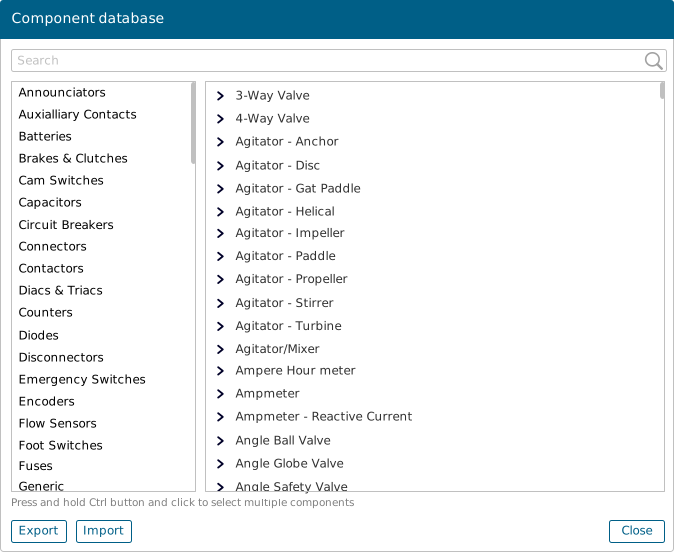
Component information are organized by categories. For example, when selecting components for a relay symbol, users will be presented with multiple relays in the "Relay" category.
Categories simplify component selection, and still offers the ability to select outside a category using search functions.
Organizing components and categories is super easy, with simple drag and drop and you're done. Components can appear in one or more categories for even more flexibility.
 How to customize your own component database, export to modify them and import it back into Capital X Panel Designer
Symbols with brains built in
Some symbols in Capital X Panel Designer go even further to help complete time consuming and tedious manual actions.
For example, the TerminalList symbol automatically lists all terminals that have been placed in a drawing.
The TerminalBlock symbol automatically counts and numbers all terminal listings when organized in a block.
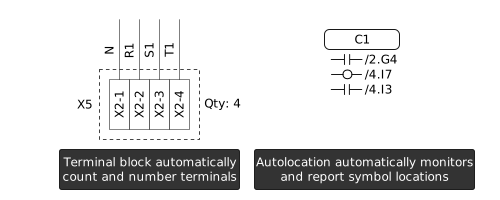
The AutoLocation symbol automatically monitors schematic symbols and report their locations, even over multiple pages.
The PLC symbol can be used to generate input or output points, whether digital or analog.
 Smart symbols in Capital X Panel Designer lets you generate terminal listing, display multiple forms and many more powerful benefits
Piping and Instrumentation Diagram (P&ID)
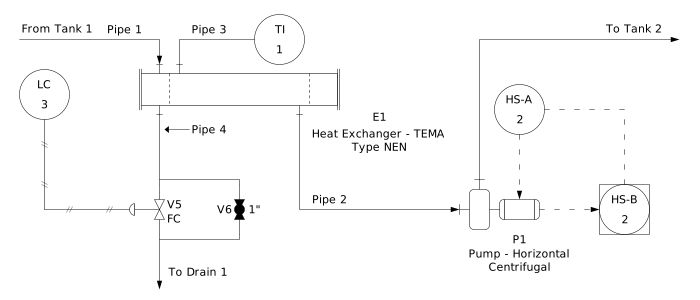
Piping and instrumentation diagrams (P&ID) are illustrations by engineers to show the functional relationships between piping, instrumentation, mechanical, chemical, or manufacturing processes. They can also be used to depict manufacturing processes for physical plants.
In Capital X Panel Designer, P&ID comes with commonly used ISO and PIP standards, and contains all the easy to use functionalities, such as autowiring, automatic and intelligent naming, ability to create prefab circuits, and generating bill of material reports that you expect from this electrical CAD software.
Smart P&ID symbols
Instrumentation symbols in Capital X Panel Designer are smart and can automatically show Type and Loop numbers.
If you modify the reference for a symbol, Capital X Panel Designer will automatically update the Type and Loop numbers on the symbol itself, without you doing a thing. This ensures you get to complete your diagrams really quickly.
 Easily create P&IDs in Capital X Panel Designer with time-saving automations and smart symbols
Boost your electrical circuit drawing workflow with Capital X Panel Designer
Skip the tedium and repetitiveness and turn your electrical circuit drawing into a quick and easy process!
With Capital X Panel Designer's electrical engineering drawing software, everything from wiring symbols to copying and pasting to illustrating P&ID, is made more efficient and accessible.
It's safe to say that Capital X Panel Designer is the only online electrical drawing software you need!
Seamless component integration with CADENAS
Capital X Panel Designer now seamlessly integrates with the CADENAS cloud part library. This powerful integration grants you direct access to millions of manufacturer-specific components within your design environment. No more time-consuming searches across external sources! This centralized library streamlines your workflow, saving you valuable time and boosting design efficiency.
Furthermore, the CADENAS library, 3Dfindit provides standardized components, ensuring consistency and compatibility throughout your designs. This minimizes errors and oversights during the assembly or manufacturing stage.
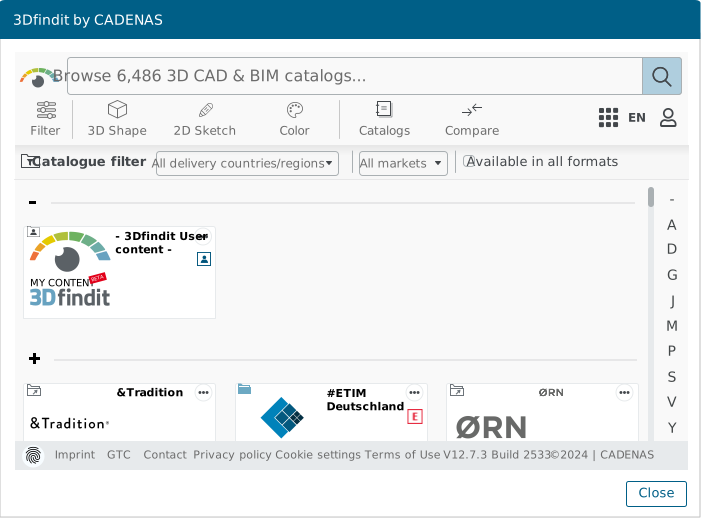
By leveraging the cloud-based library, you can design with speed, convenience, and efficiency, knowing you're using the most up-to-date component specifications, ultimately leading to safer and more accurate circuits.
Only available with Capital X Panel Designer Standard license.
 Streamline workflow and save time with direct access to millions of components and layouts