August 20, 2025 · Capital X Panel Designer · Electrical CAD
Overcoming Electrical Terminal Strip Generation Challenges with Electrical CAD Software
Key Takeaways
- Electrical terminal strips are insulated modular blocks that securely connect and organize multiple wires in control panels, junction boxes, and distribution systems.
- Common challenges include wiring complexity, connector compatibility issues, space constraints, and maintaining compliance with industry standards.
- Proper terminal strip design improves system reliability, simplifies maintenance, and reduces costly downtime.
- Capital X Panel Designer automates terminal generation, numbering, and documentation—enabling engineers to complete circuits much faster than legacy CAD software.
- Cloud-native collaboration in Capital X Panel Designer ensures real-time synchronization between schematics and terminal layouts across teams.
Introduction
Electrical terminal strip generation is the process of designing, organizing, and documenting terminal connections within electrical schematics to ensure safe, reliable, and maintainable wire management in control panels and distribution systems.
Electrical terminals play a vital role in powering various devices, ensuring the smooth flow of voltage, current, and signals. However, problems with electrical terminal strips, such as incorrect sizes or incompatibility with existing connectors, can lead to suboptimal performance or even disruptions.
Mastering terminal strip intricacies is crucial for engineers to effectively address related challenges. Fortunately, the advent of Computer-Aided Design (CAD) software has revolutionized this aspect of electrical engineering. Utilizing advanced electrical CAD software resolves common terminal strip generation issues while streamlining design and modification, enhancing system reliability, safety, and efficiency.
What is an Electrical Terminal Strip?
An electrical terminal strip is an insulated modular block that connects and secures multiple electrical wires in control panels, junction boxes, and power distribution systems. Also called a terminal block, connector block, or barrier strip, it provides organized, accessible connection points that simplify installation, maintenance, and troubleshooting in multi-wire applications.
What are Terminal Strips Made of?
A terminal strip consists of a series of insulated connection blocks connected in a long row. Each block contains a current-carrying element (either a metal strip or terminal bar) and a clamping component for holding the wires in place.
The main block body of a terminal strip is typically made of a hardy, non-conducting material such as plastic or ceramic, designed to electrically isolate adjacent blocks, while the conducting parts are made out of copper, brass, tin, or other metals compatible with copper to ensure reliable conductivity and corrosion resistance.
These features make terminal strips a common but vital component in electrical panels, junction boxes, and other applications that require multi-wire connections.
How are Terminal Strips Connected?
Terminal strips are connected by inserting stripped wire ends into the terminal block and securing them using one of five connection methods: screw clamps, spring clamps, insulation displacement, tab connectors, or pluggable sockets.
Here are five of the more popular ones:
Screw-in: Uses screws as the method for holding the wires. A similar model is the barrier terminal block, which uses a small lid to protect the wiring.
- Best for permanent connections requiring high pull-out strength.
Spring-loaded: In this design, the wire (which is usually attached to a ferrule) is simply inserted into the block, where it is held in place by a spring-loaded clamp. A spring release device is used to activate or release the spring.
- Ideal for high-volume wiring and vibration-prone environments.
Insulation Displacement Connector (IDC): This model uses two sharp blades inside the terminal block to slice through the wire insulation and make contact with the wire.
- Used for quick field terminations without stripping.
Tab Connector terminal block: In this model, a wire attached to a connector is pushed onto a tab. Depending on the type of connector used, the wire can then be crimp-connected or soldered.
- Common in automotive and appliance applications
Pluggable terminal block: In this model, the wire is inserted into a pluggable block and clamped with a screw. The block is then plugged into a socket configuration.
- Enables quick equipment disconnection for servicing.
What is the Electrical Terminal Strip Used For?
Electrical terminal strips play an essential role in streamlining electrical connections and improving the overall design and functionality of electrical systems.
Electrical terminal strips are used in a wide range of applications, including:
Control Panels: Terminal strips are often used in control panels to connect sensors, switches, and other components to the control system and to connect power cables.
Building Wiring: Terminal strips are commonly used in building wiring to connect electrical cables to light fixtures, outlets, and switches. They can also create branch circuits and connect multiple wires.
Power Distribution: Terminal strips connect power cables to distribution panels and switchgear in power distribution systems. They also connect transformer windings and create multiple power taps from a single source.
What are the Advantages of Electrical Terminal Strips?
Electrical terminal strips offer streamlined organization, simplified wiring, easier maintenance, design flexibility, improved safety, industry standardization, and space efficiency:
Centralized Connections: Terminal strips consolidate multiple wire connections into a single accessible location, reducing cable clutter and simplifying circuit tracing.
Tool-Free Maintenance: Spring-loaded and pluggable terminals allow wire removal without specialized tools, minimizing service time during repairs.
Modular Expansion: Adding new circuits requires only mounting additional terminal blocks—no rewiring of existing connections needed.
Individual Wire Replacement: Faulty connections can be isolated and replaced without disturbing adjacent wires, unlike spliced or soldered joints.
Visual Inspection: Exposed connection points allow technicians to quickly identify loose wires, corrosion, or damage during routine checks.
Cross-Manufacturer Compatibility: Standard DIN rail mounting and terminal sizes ensure components from different manufacturers work together.
Reduced Panel Footprint: Multi-level terminal blocks stack connections vertically, maximizing wire density in space-constrained enclosures.
Designing and Organizing Terminal Strips Correctly: Why It Matters?
Accuracy and precision in designing and organizing electrical terminal strip connectors are crucial for an efficient system.
A well-designed terminal strip enables reliable connections, simplified installation, efficient troubleshooting, minimal downtime, optimized space utilization, regulatory compliance, and easier long-term maintenance.
Faster Installation: Logical terminal arrangement with clear labeling reduces wiring time and eliminates guesswork during panel assembly.
Lower Service Costs: Accessible terminal placement minimizes labor hours during troubleshooting and component replacement.
Reduced Commissioning Errors: Systematic terminal numbering aligned with schematics prevents miswiring that causes startup delays.
Extended Equipment Life: Proper spacing and thermal management prevent overheating that degrades terminal connections over time.
Audit-Ready Documentation: Well-organized terminal layouts simplify compliance verification during safety inspections and audits.
Scalable Architecture: Forward-thinking designs reserve terminal positions for future expansion without requiring panel modifications.
Knowledge Transfer: Clear terminal organization allows new technicians to understand system wiring without extensive training.
Terminal Strips in Design Changes
Design changes in electrical systems introduce challenges around terminal type compatibility, size and capacity adjustments, optimal placement, standards compliance, system integration, and documentation control.
These design changes can significantly complicate the generation and organization of terminal strips. Engineers must, thus, take a meticulous approach to maintain the system’s integrity and reliability.
Adapting to New Terminal Strip Types
Engineers must be careful when selecting new components for integration. If the component is incompatible with the existing setup or revised design requirements, it may result in incompatibility issues that could affect system performance.
Size and Capacity Adjustments
As systems evolve, so do their requirements for power and signal distribution. Engineers must find a terminal strip that can accommodate the revised system's requirements without compromising safety or efficiency. Incorrect size or capacity choices can lead to issues such as overcrowding, overheating, or even system failure.
Optimal Placement for Accessibility and Efficiency
As systems are reconfigured, the optimal placement of terminal strips can be affected. Engineers must take care when placing terminal strips to ensure ease of access, wiring efficiency, and maintenance convenience. Poorly placed terminal strips can lead to maintenance difficulties, increased risk of wiring errors, and potential safety hazards.
Maintaining Compliance and Standards
Maintaining compliance with industry standards and best practices is a critical part of making design changes. If the chosen terminal strips and their configurations fail to adhere to these standards, it can result in safety risks, legal issues, and compatibility problems with other components or systems.
Integration Challenges with Existing Systems
When design changes involve integrating new components into existing systems, engineers must ensure that the new and existing terminal strips work seamlessly together. Without careful planning, problems such as signal interference, electrical incompatibility, and physical mismatches will arise and compromise the system's overall functionality.
Documentation and Revision Control
Accurate documentation is critical when implementing design changes, especially concerning terminal strip generation and organization. Schematics, wiring diagrams, and installation guides must be up-to-date on any changes made, ensuring that maintenance personnel have the correct information. This, in turn, will reduce the risk of errors during future system modifications.
Navigating these challenges is vital in ensuring that the updated electrical systems are reliable, safe, and capable of meeting the evolving requirements.
What are the Challenges and Common Issues with Terminal Strip Generation?
Electrical engineers encounter a range of challenges when working with electrical wire terminals and terminal block design. Here are some common issues they face:
1. System Design and Compatibility Challenges
Wiring Complexity: Managing and organizing numerous wires in large-scale systems, especially with frequent modifications, is daunting.
Terminal Strip Selection and Size: It is challenging to select the right size and type from a wide variety of terminal strips. Incorrect choices can lead to overcrowding, overheating, or wasted space.
Compatibility Issues: Updating terminal strips requires careful consideration of compatibility with existing connectors to avoid signal degradation, voltage drops, or connection failures.
2. Space and Resource Management
Space Constraints: Overcrowded connector blocks can compromise system performance by limiting access, increasing short circuit risk, or affecting airflow.
Resource Constraints: Limited time, budget, or workforce can hinder the efficient generation or updating of terminal strips.
3. Compliance and Standardization
Standards Compliance: Adhering to complex industry standards is essential to avoid safety hazards, regulatory non-compliance, or compatibility issues.
Consistency with Wiring Standards: It is crucial to ensure that design changes adhere to established wiring standards and best practices to maintain uniformity and consistency.
4. Challenges Arising from Design Changes
Compatibility of Electrical Terminal Strip Types: Design changes may require different terminal strip types, raising compatibility concerns.
Size and Capacity Considerations: Terminal strips may need to be adjusted to meet new system requirements, avoiding inefficiencies or system integrity risks.
Optimal Placement: To avoid tangled wiring or maintenance difficulties, terminal block placement must be reconfigured for optimal wiring layouts and accessibility.
Integration of New Components: Careful integration of new wiring connector blocks with existing wiring is crucial to prevent incompatible connections or operational issues.
Documentation and Revision Control: Accurate documentation of design changes is vital to avoid confusion, errors, or safety risks during installation, maintenance, or troubleshooting.
Managing terminal strips in schematics presents various challenges, such as adapting to design changes that require size adjustments, careful placement and maintaining accurate documentation. Using advanced CAD software can significantly address these common issues, ensuring the system's reliability, safety, and efficiency.
Ready to simplify your terminal strip management?
Capital X Panel Designer automatically generates, numbers, and organizes electrical terminal strips — saving hours of manual work. Engineers complete circuits much faster compared to traditional CAD software. Start your free 30-day trial →
Leveraging Electrical CAD Software for Efficient Terminal Strip Generation
Faced with these challenges, leveraging advanced electrical CAD software solutions has become a pivotal strategy for streamlining the generation, management, and updating of terminal strips in electrical schematics.
Software tools such as Siemens’ Capital X Panel Designer are designed for this purpose, offering a range of features and benefits that can significantly mitigate the common issues associated with terminal strip generation.
Here's how Capital X Panel Designer electrical CAD software can transform this critical aspect of terminal strip management:
1. Automated Wiring
Capital X Panel Designer can automatically wire connections within large-scale electrical systems, reducing the complexity of handling numerous wires. When compared to manual wiring, auto wiring is nearly 3 times faster with much fewer errors. This is especially useful in frequently updated or expanded systems.
2. Optimized Space Utilization
Capital X Panel Designer’s automated tools can provide optimal placements of terminal strips within the electrical schematic. These tools ensure that terminal strips are positioned for easy access while reducing the risk of short circuits and maintaining efficient airflow. This not only improves the schematic's organization but also contributes to better system performance and reliability.
3. Resource Management
Capital X Panel Designer’s tools can streamline the terminal strip generation process, improving the utilization of limited resources such as time, budget, and workforce. This improved efficiency can be crucial in projects with tight deadlines or budget constraints.
4. Compliance with Standards
Software tools are consistently updated to comply with the latest industry standards. This helps engineers ensure that their designs comply with all the necessary safety and regulatory requirements, reducing safety risks and ensuring compatibility with other systems or components.
5. Facilitating Design Changes
Capital X Panel Designer excels at managing design changes by easily updating terminal strip configurations, ensuring compatibility with new components, and maintaining optimal placement and capacity considerations. This grants the flexibility and adaptability needed for evolving system requirements without compromising performance or reliability.
6. Documentation and Revision Control
CAD software tools provide robust documentation and revision control features, ensuring that all design changes are accurately reflected in the electrical schematics. This accuracy will help prevent confusion, errors, and safety risks during installation, maintenance, or troubleshooting phases.
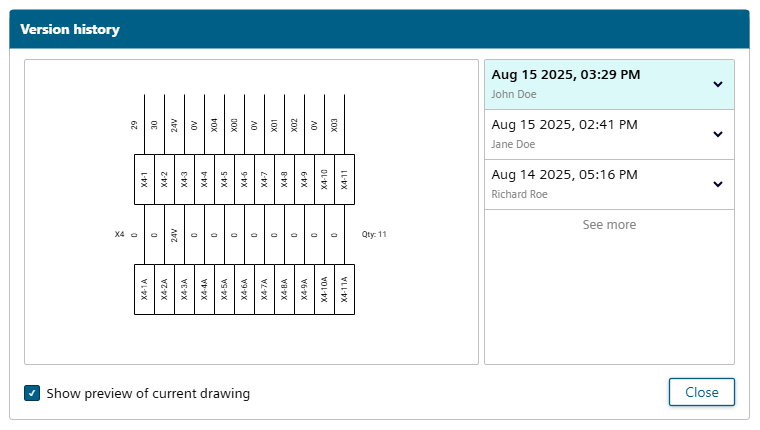
Electrical engineers must be willing and ready to leverage CAD software in terminal strip generation. This technology will help them better address the myriad challenges in managing terminal blocks, leading to more reliable, compliant, and efficient electrical schematic design.
How Does Cloud-Based CAD Improve Terminal Strip Generation Over Traditional Methods?
Traditional desktop CAD software for electrical terminal strip design often requires heavy installations, complex training (typically 3-6 months to become productive), and manual synchronization between schematics and panel layouts. Cloud-native solutions like Capital X Panel Designer eliminate these barriers — requiring only a few days of training, providing automatic synchronization, and enabling real-time collaboration that traditional desktop software cannot match.
Tips for Managing Terminal Strips in Electrical Schematics
Effective terminal strip management requires proper connector selection, strategic placement, timely schematic updates, thorough testing, and documented training procedures.
Here are some practical tips to make this daunting task easier:
Selecting the Right Terminal Block Connectors: Choose a terminal block with the right design, size, connector type, and material for your needs. Understanding your system’s electrical requirements is equally important.
Using Wiring Blocks Effectively: Plan the layout and placement of your wiring blocks strategically. Labeling your terminal blocks and grouping wires with similar functions will make identification easier. Don’t forget to maintain comprehensive documentation of your layouts.
Integration into Electrical Schematics: Be sure to update your electrical schematics promptly as you regenerate your terminal strip connectors. Doing so will ensure that your documentation remains aligned with the system’s physical configuration as well as improve traceability. Implementing a revision control system will make this procedure easier.
Testing and Verification: Comprehensive testing is essential for verifying your system’s integrity. Always inspect terminal strip connectors for any wiring errors, loose connections, or damage that could affect system performance or safety. Address any issues promptly to prevent potential failures or hazards.
Training and Documentation: Personnel should be trained on the proper procedures for managing terminal strips, including wiring practices, safety precautions, and documentation requirements. Always keep comprehensive records of your terminal block connections at hand for your personnel’s future reference.
By following these tips, you can enhance the system reliability, maintainability, and safety of your electrical installations.
Frequently Asked Questions
1. What are electrical terminals?
Electrical terminals are connection points that join electrical wires or cables to devices, equipment, or other wires. They provide secure, organized connections that enable the safe flow of electrical current throughout a system.
2. What is a terminal strip in electrical systems?
A terminal strip serves as the central wiring hub within electrical systems, enabling engineers to route, connect, and manage multiple circuits from a single, organized location. This centralization simplifies system assembly and reduces troubleshooting time during maintenance.
3. How to use electrical terminals effectively?
Select terminals matching your wire gauge and current requirements, ensure proper insulation, follow manufacturer torque specifications for screw-type connections, and maintain clear labeling for troubleshooting. Regular inspection prevents loose connections.
4. What are the different types of electrical wire terminals?
Terminal types include screw, spring-loaded, IDC, tab, and pluggable connections. Selection depends on wire gauge, current rating, installation speed requirements, vibration exposure, and whether connections need frequent disconnection for servicing.
5. Why do insulated electrical terminals matter for safety?
Insulation prevents arc flash, protects technicians from live conductor contact, and maintains required creepage and clearance distances between circuits. Without proper insulation ratings, terminals may fail electrical inspections or create fire hazards.
6. What is the difference between a terminal block and terminal strip?
A terminal block is a single connection module, while a terminal strip is multiple blocks mounted together on a DIN rail or panel. In practice, engineers use both terms interchangeably when specifying components for control panel designs.
7. How does electrical CAD software improve terminal strip design?
CAD software automates terminal generation, numbering, and documentation while ensuring compliance with standards. Capital X Panel Designer enables engineers to complete circuits 3-5x faster and automatically synchronizes changes across schematics and layouts.
Conclusion
In conclusion, a well-generated electrical terminal strip helps streamline and organize electrical connections, improving system efficiency and reliability. Engineers will, however, face challenges when generating or updating electrical terminal blocks. Overcoming these challenges is a daunting task.
Fortunately, electrical CAD software like Capital X Panel Designer can help simplify the more complicated procedures in electrical terminal generation. It gives engineers more time to work on their connection block designs, leading to the creation of advanced and safe electrical engineering projects.
With cloud-native accessibility, real-time collaboration, and powerful automation tools, Capital X Panel Designer transforms how engineers approach electrical connectors terminals, and terminal strip management — delivering faster results with fewer errors.
Ready to eliminate terminal strip generation headaches?
Join thousands of electrical engineers using Capital X Panel Designer to create accurate terminal strips and complete circuits faster. Start your free 30-day trial — no credit card required.